

Check customer VAT details during checkout.
Add VAT checks to your checkout. Treat invalid numbers and unavailable checks separately, and route unresolved records for review.
No card required. Live availability varies by country, check and account access.
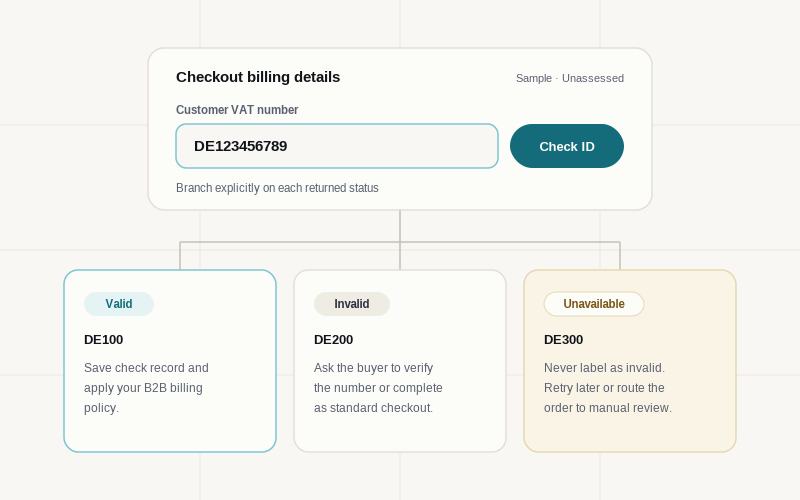
A failed check needs a clear next step
A tax service that cannot answer has not declared the VAT number invalid. Keep the two outcomes separate in your checkout and billing review.
- Ask customers to review missing or mismatched details.
- Use your own policy to handle checks that cannot finish.
Handle each result explicitly
Your developers can connect supported VAT and company checks to your checkout through the API. Your application controls when to retry or request customer follow-up. Company search is live in the 27 EU member states, Iceland, Liechtenstein and Norway, with a preview in Switzerland.
- Check the VAT number
Run an available validation and preserve the returned result and its limits.
- Review the company match
Where company search is available, confirm the match before using the returned company details in billing.
Know what the result confirms
A temporary authority outage returns `unavailable`, never `invalid`. Your checkout flow decides whether to hold an order, retry with the same idempotency key or ask the customer to re-enter details.
We name only reviewed government services for the fields they support; other permitted sources remain anonymous categories and represent partial data correlation. Saved records keep their original observation dates under current disclosure, access and retention rules.
Read how check records workReview customer details before billing.
Create a free account to explore sample results and the checks available to your business. Live availability varies by country, check and account access.