

Review customer details before e-invoicing.
Check available company details and VAT results before preparing invoice data. Apply the requirements for your invoicing system separately.
No card required. Live availability varies by country, check and account access.
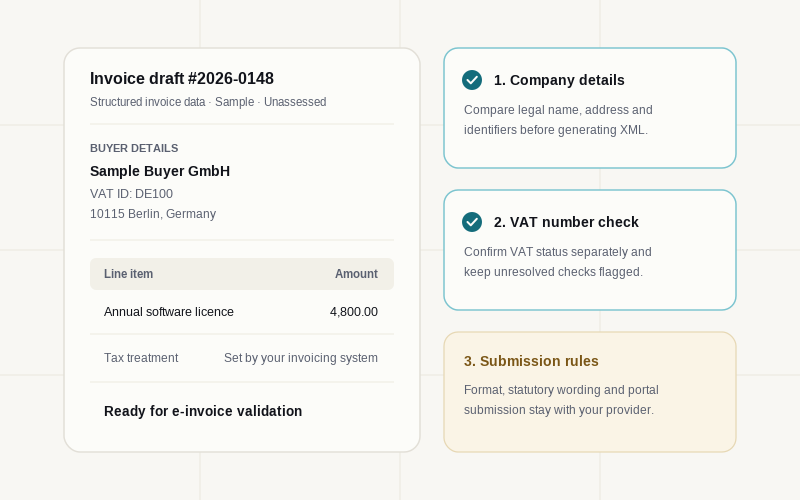
Customer checks are one part of invoice preparation
Your invoice process needs customer details as well as the formats, tax treatment and submission rules for the transaction.
- Confirm the company details used in the invoice.
- Check your invoicing system requirements separately.
Review the customer record first
Use supported company and VAT checks before preparing invoice data. These checks do not replace validation by your invoicing provider or the relevant authority. Company search is live in the 27 EU member states, Iceland, Liechtenstein and Norway, with a preview in Switzerland.
- Review company details
Compare the returned name, address and identifiers with your customer records.
- Review the VAT finding
Keep the separate VAT result and unresolved items. Automatic tax treatment and statutory wording are not established by a company match.
Know what the result confirms
Pre-flight checks verify buyer identifiers before XML generation, but they do not validate e-invoicing schemas, statutory invoice wording or clearance by a national platform.
We name only reviewed government services for the fields they support; other permitted sources remain anonymous categories and represent partial data correlation. Saved records keep their original observation dates under current disclosure, access and retention rules.
Read how check records workReview customer details before billing.
Create a free account to explore sample results and the checks available to your business. Live availability varies by country, check and account access.